AI tools are now part of everyday software development, but the names change fast and the overlap is confusing. This page is the map: the handful of concepts you need, and where GitHub Copilot, Claude and Microsoft Foundry each fit. Every section links to a deeper, hands-on post in this series.
Who this is for: developers and architects who want to use AI in real projects, not just read about it.
The core concepts in five minutes
Every AI product, whatever its brand, is built from the same eight ideas. Learn these once and each new tool becomes easier to place.
| Concept | What it means | Example |
|---|---|---|
| Large language model (LLM) | A model trained on huge amounts of text that predicts the next word; it can write, summarize, reason about and generate code | Drafting release notes from a list of merged pull requests |
| Tokens and context window | Models read text in chunks called tokens; the context window is how much they can consider at once, including your prompt, files and the reply | Whether a whole codebase fits, or only the module you’re working on |
| Prompt and system instructions | The prompt is your request; system instructions set standing rules the model follows for every request | “Write C# with nullable reference types enabled and always add unit tests” |
| Retrieval-augmented generation (RAG) | Search your own content first, then give the matching passages to the model so answers are grounded and citable | An internal assistant that answers only from your team’s documentation and cites the page |
| Tool use (function calling) | The model decides to call a function you define, such as a search or an API, and uses the result in its answer | The model calls an order-status API to answer a customer’s question |
| Agent | A model that works in a loop: plan, call tools, check results, repeat until the task is done | Fixing a failing test: read the error, edit the code, rerun, repeat |
| Model Context Protocol (MCP) | An open standard for connecting AI assistants to tools and data, so one integration works across many assistants | One GitHub MCP server that Claude, Copilot and Foundry agents can all use |
| Evaluation and guardrails | Testing AI output against known cases, and limiting what it may see and do | Scoring answers against 50 known questions; keeping personal data out of prompts |
How the three fit together
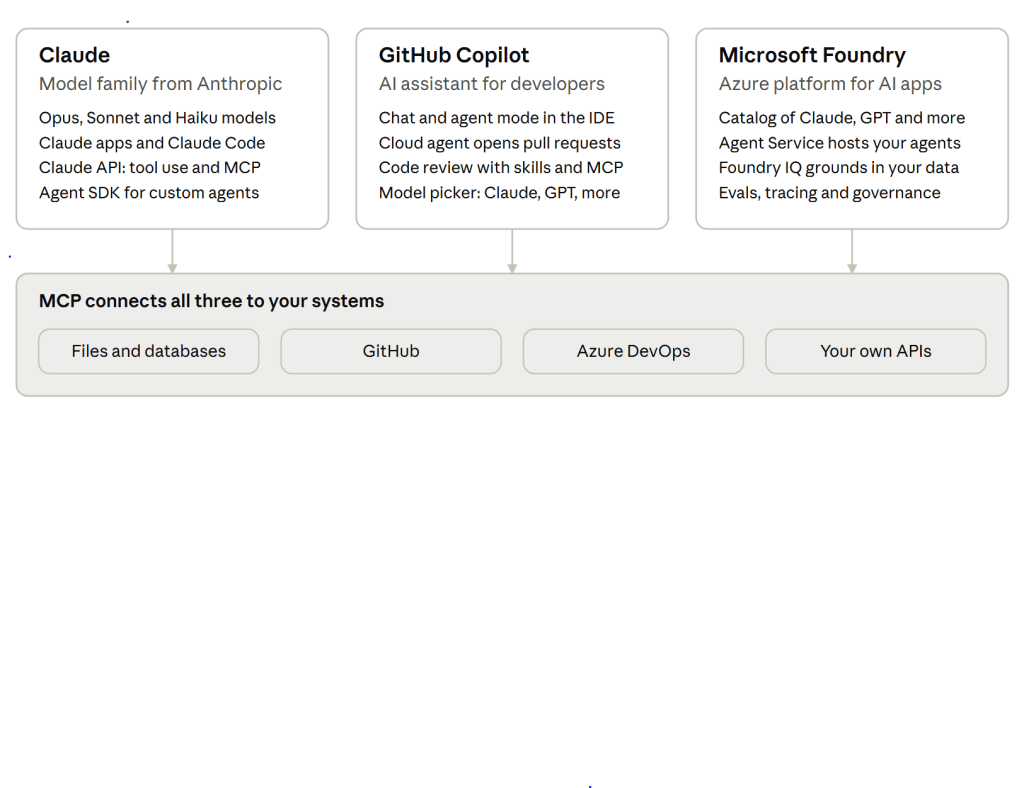
These aren’t three competing products. GitHub Copilot is where developers write code, Microsoft Foundry is where you build and run your own AI apps on Azure, and Claude is a model family you can use directly or inside both of them.
Claude, GitHub Copilot and Microsoft Foundry each play a different role
GitHub Copilot at a glance
GitHub Copilot is an AI assistant built into your editor and into GitHub itself. It’s the easiest starting point for most development teams, because it works inside the tools you already use.
- Chat and agent mode in VS Code, Visual Studio and JetBrains: ask questions about your code, or let it make multi-file changes that you review.
- Cloud agent on GitHub: assign it an issue and it researches, plans and makes changes on a branch, then you review the pull request.
- Code review: Copilot reviews pull requests, and since July 29, 2026 it can use your team’s skills and MCP servers during review.
- Custom instructions: a
.github/copilot-instructions.mdfile teaches it your conventions, such as project structure, naming and testing rules. - Model choice: the model picker includes Claude models alongside OpenAI and others, subject to your plan and admin policy.
Use it for: everyday coding, refactoring, unit tests, and routine tickets turned into pull requests.
Claude at a glance
Claude is a family of AI models from Anthropic, known for strong coding, long-document reasoning and agent work. You can use it in Anthropic’s own apps, call it from your code, or pick it inside Copilot and Foundry.
- Model tiers: larger models (Opus) for the hardest reasoning and coding, mid-size models (Sonnet) for most production work, and small fast models (Haiku) for high-volume tasks. The current lineup includes Claude Opus 5.5 and Claude Sonnet 5.
- Claude apps: chat on web, desktop and mobile, with connectors to your tools.
- Claude Code: a coding agent that works in your terminal and IDE, reads the whole repository, runs commands and edits files. A
CLAUDE.mdfile holds your project rules. - Claude API and Agent SDK: call Claude from your own services, give it tools to use, and build custom agents.
- MCP: Anthropic introduced the Model Context Protocol, and Claude connects to MCP servers for tools such as GitHub, databases and your own APIs.
- Where it runs: directly from Anthropic, inside GitHub Copilot, and in Microsoft Foundry, where some models support a 1M-token context window.
Use it for: complex refactors and code reviews, long specs and documents, content assistants, and agents that take multi-step actions.
Microsoft Foundry at a glance
Microsoft Foundry is Azure’s platform for building, running and governing your own AI apps and agents. It went by Azure AI Studio and then Azure AI Foundry, so older tutorials use those names.
- Foundry Models: a large catalog of models from OpenAI, Anthropic, Meta and others. Claude is generally available there, hosted on Azure, using your Azure authentication, billing and governance.
- Foundry Agent Service: a managed runtime for building, deploying and scaling agents. Start with a prompt agent defined in the portal, or package your own code as a hosted agent.
- Tools: web search, file search, code interpreter, MCP servers and your own functions, shared across agents.
- Foundry IQ: grounds agents in your organization’s knowledge, such as SharePoint and Fabric.
- Enterprise controls: tracing, monitoring and evaluations in one place, plus Entra ID, role-based access and network isolation.
Use it for: customer-facing AI features on Azure, such as a customer support assistant over your product documentation, where you need governance, monitoring and data residency.
Side by side, and which to use when
Most teams end up using all three: Copilot or Claude Code for building the solution, and Foundry or the Claude API for AI features inside the product.
| GitHub Copilot | Claude | Microsoft Foundry | |
|---|---|---|---|
| What it is | AI assistant for developers | AI model family, plus apps and API | Azure platform for AI apps and agents |
| Who uses it | Developers | Developers, content and business teams | Developers and architects building products |
| Where it runs | IDE and GitHub | Claude apps, API, inside Copilot and Foundry | Your Azure subscription |
| Customize with | copilot-instructions.md, skills, MCP | System prompts, CLAUDE.md, tools, MCP | Agent instructions, tools, Foundry IQ knowledge |
| Best for | Daily coding and pull requests | Hard reasoning, long context, agents | Governed, production AI features |
Which to pick:
- Writing and reviewing code day to day → GitHub Copilot, switching to a Claude model for bigger refactors.
- Repository-wide changes or long, multi-step coding tasks → Claude Code.
- A customer-facing assistant or agent that must meet enterprise security and monitoring rules → Microsoft Foundry, with Claude or GPT as the model.
- A quick prototype, or a feature running outside Azure → the Claude API directly; move it to Foundry later if you need Azure governance.
- Research, writing and analysis for the whole team → Claude apps.
Coming next in this series
- LLMs Explained: Tokens, Context Windows and Prompts
- RAG from Scratch: Grounding Answers in Your Own Documents
- Tool Use and Agents, Explained
- MCP: Connecting AI to Your Tools and Data
- Teaching GitHub Copilot Your Team’s Conventions
- Calling Claude from ASP.NET Core
- Building Your First Agent on Microsoft Foundry
- Evaluating and Guarding AI Features
Subscribe to get each post by email.

